Every ad platform reports its own conversions. Trailhead reports what actually happened.
Trailhead measures from your side of the fence. Clicks are captured on your own domain, revenue comes out of your own systems, and the two are joined by hard evidence. Every figure on a Trailhead dashboard traces back through a named rule to a specific click and a specific payment.
No third-party pixel. Capture sets no cookies. Delivery to your ad platforms runs in sandbox until Trailhead clears it for a specific ad account, with you.
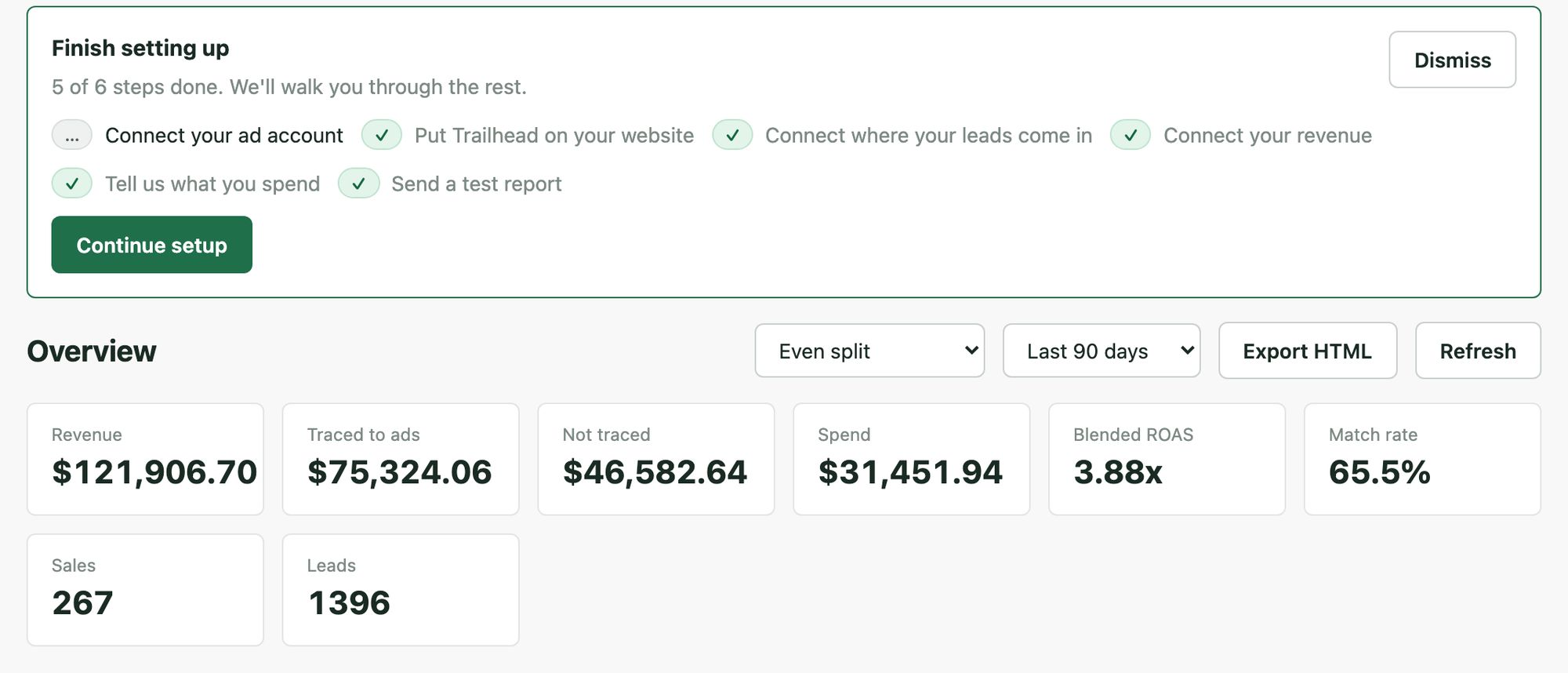
The platforms grade their own homework
Every ad platform reports its own conversions, and every one of them is structurally motivated to claim as many as it can. Two platforms routinely both take credit for the same sale. Modeled conversions fill the gaps with estimates. And none of it is connected to what landed in your bank account.
A $40 lead that became a $12,000 job and a $40 lead that ghosted look identical in a platform dashboard. So claimed performance keeps looking better than the business feels, and budget gets allocated on numbers produced by the party selling the ads.
The tools that promised to fix this mostly moved the problem. Another pixel on your site, another vendor holding your customer data, another model producing numbers nobody can trace.
What a platform can tell you
Its own claimed conversions, and its own cost.
- conversions
- cost
- cost / conv.
- conv. value (modeled)
What your books can tell you
Money, with no idea where it came from.
- invoice
- closed job
- order total
- refund
Trailhead is the join between those two lists.
Click in, revenue out, and back to the optimizer
Six steps. The first five are repeatable: run the same data through twice and you get the same answer twice. The sixth is the one that refuses to run twice.
- Capture A one-line snippet posts click ids, UTMs and consent signals to a worker on your own subdomain. No cookies, no logging, an empty 204 back.
- Identity Leads arrive over signed webhooks. Email and phone are hashed at the front door and only the hashes are kept.
- Revenue Closed jobs, paid invoices, orders and refunds arrive by CSV upload or webhook. Money is validated on the way in or rejected, never silently mangled.
- Match Revenue is joined to a click by hard evidence: a click id, a phone number or an email. Every match records what it was made on.
- Attribute Five models computed side by side, and per-channel revenue always sums to the total exactly.
- Deliver A preview you approve, then a send that cannot go twice. Sandbox until an account is cleared.
Capture runs on your property
A lightweight Cloudflare Worker runs on a subdomain you own, with a direct-post
fallback if you would rather skip it. It sets no cookies, logs nothing, and
answers with an empty 204. Ad-click context survives navigation in the
visitor's own sessionStorage, not in anything Trailhead plants.
The landing URL is stored with its query string removed, so tokens and personal data that ride in URLs never persist. A click carrying no joinable signal at all is not stored. Trailhead keeps evidence, not exhaust.
Identifiers are hashed at the front door
Email and phone are normalized and one-way hashed before anything is stored. Only the hashes persist, and matching runs on hashes end to end. Raw request bodies are never stored; the audit archive is a field allowlist with the identifier sources redacted.
Webhook retries deduplicate at the database, so a replay cannot double-count a lead. Duplicate click beacons collapse into one click by construction.
Hard evidence only, and the shortcut we refuse to build
Trailhead joins an outcome to a lead by evidence a person could check: the same click identifier, the same phone, the same email. Every match records what it was made on, so you always know how solid a number is.
What matches nothing stays visible as unmatched. It is a number Trailhead shows you, not a number it hides.
-
Click id
The same platform click identifier on both sides. Strongest evidence there is.
-
Phone
The same person called and the same person paid.
-
Email
Common in retail, rarer in home services.
-
Same afternoon, probably the same person
There is deliberately no time-window-only rule. Matching on proximity alone is attribution by hope, and it is the single easiest way to make a report look better than the business.
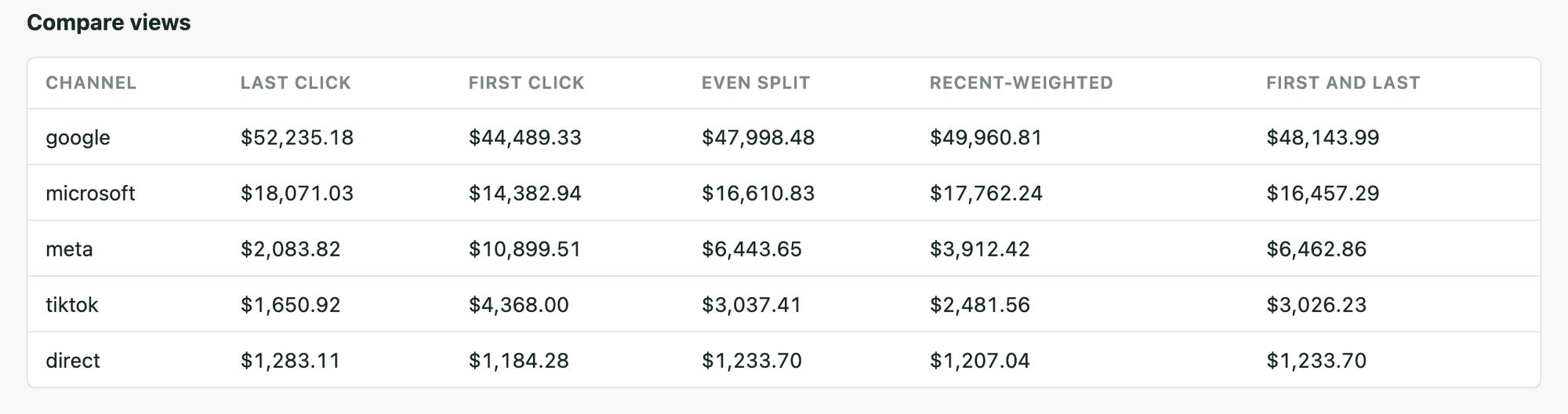
Five models side by side, because the disagreement is the finding
Switching models is one click. Comparing them is a table, because the useful question is rarely "what is the number" and usually "how much does the number depend on which story I tell".
The five
Last-touch, first-touch, linear, time-decay, and position-based. All deterministic, all computed in code.
Exact money
Per-channel numbers sum to the total to the cent, every time. No rounding drift, and no revenue that appears or vanishes in a split.
Honest buckets
Every touchpoint resolves to one channel by a fixed rule, spend counts only for the days inside the reporting window, and unattributed revenue keeps its own bucket.
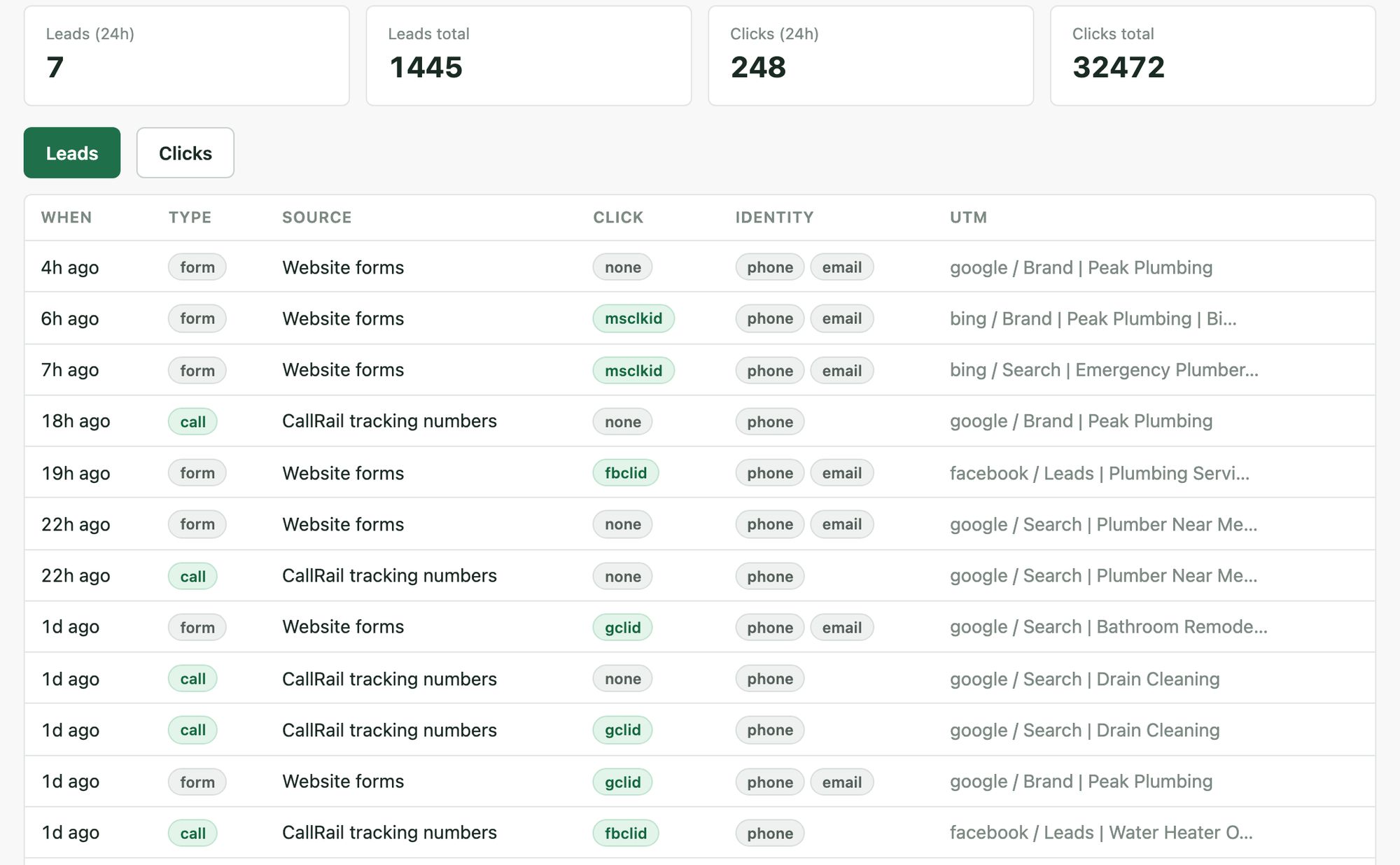
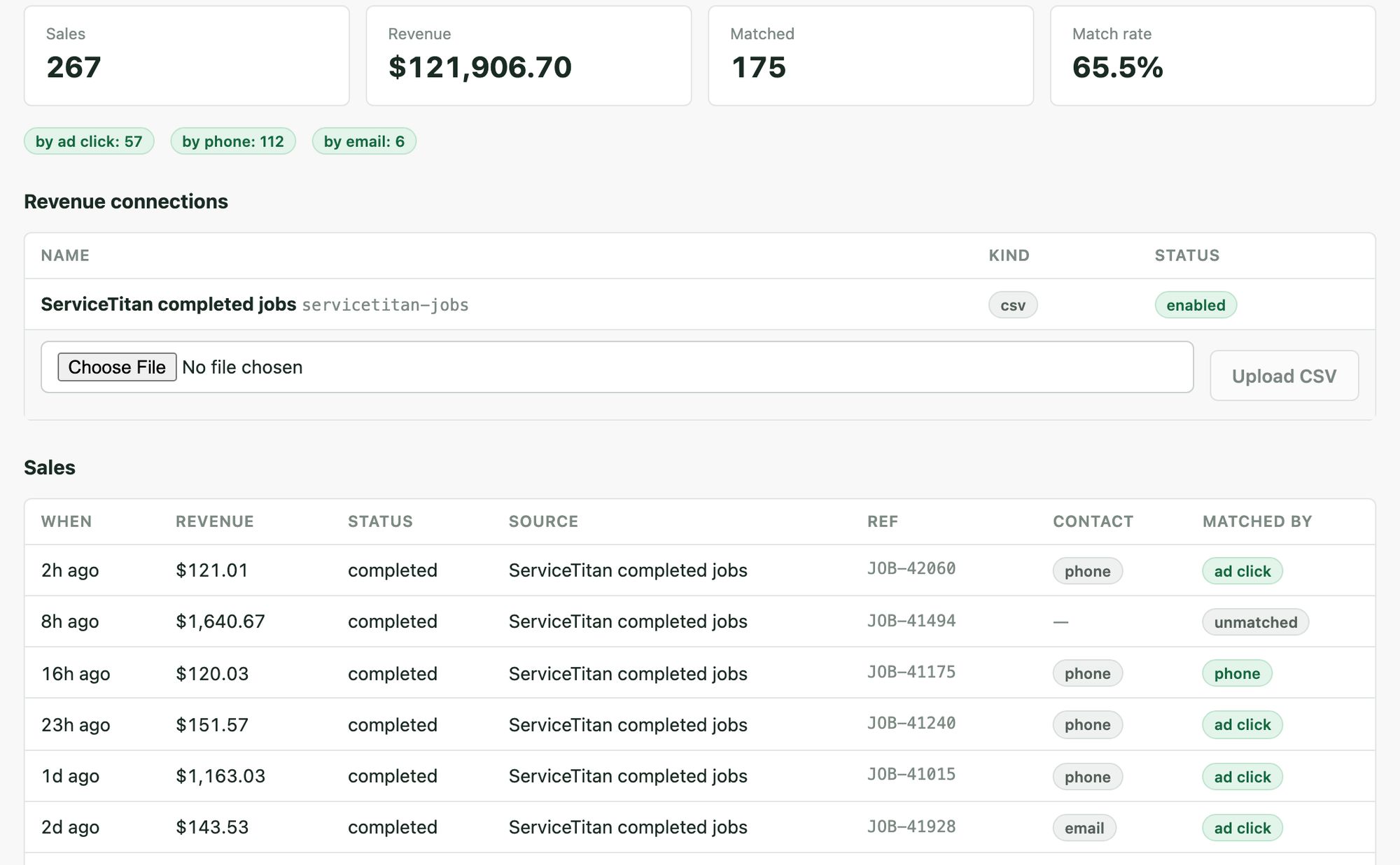
What you actually look at
Six screens. Each one answers a question somebody asks out loud in a meeting.
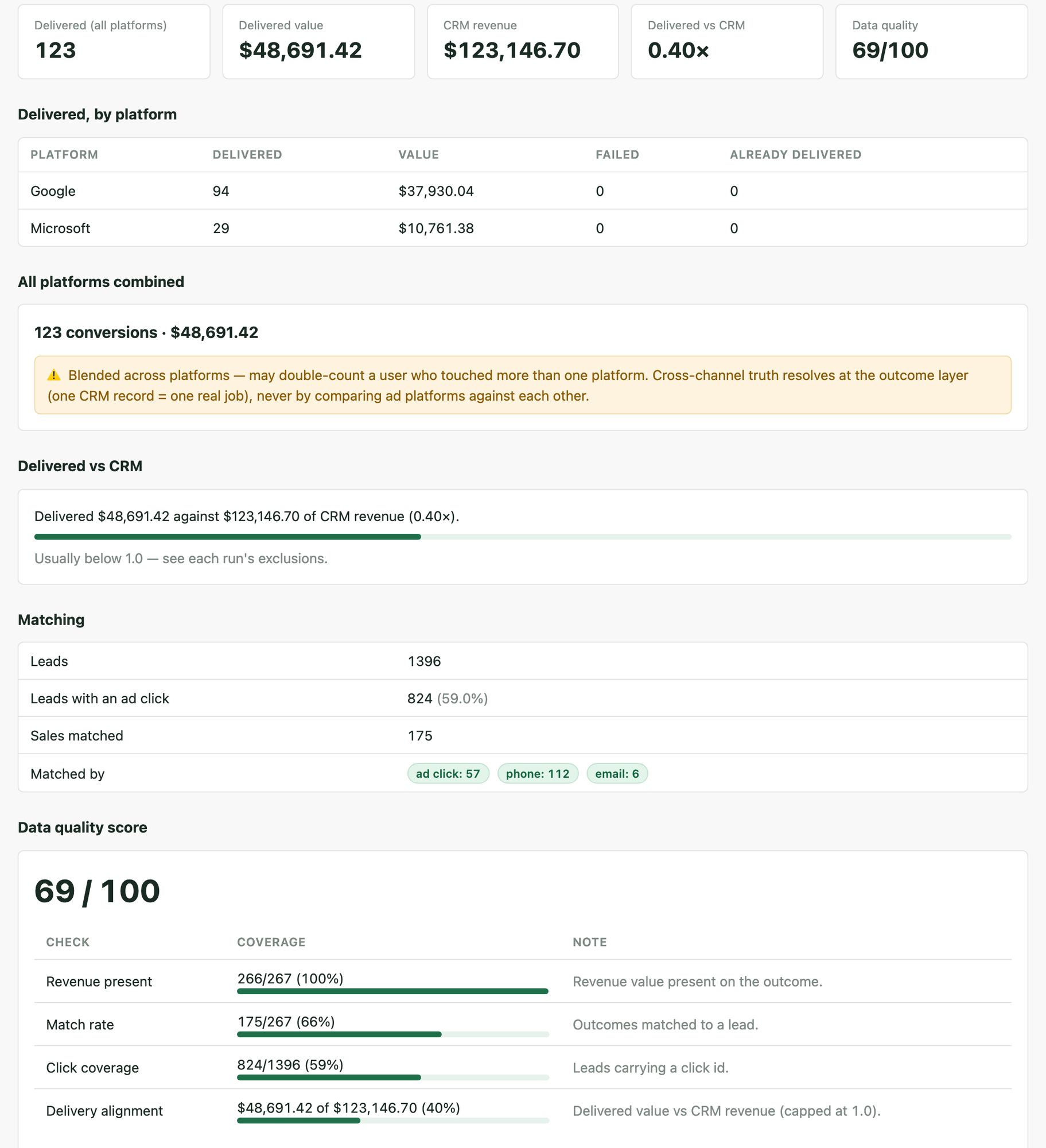
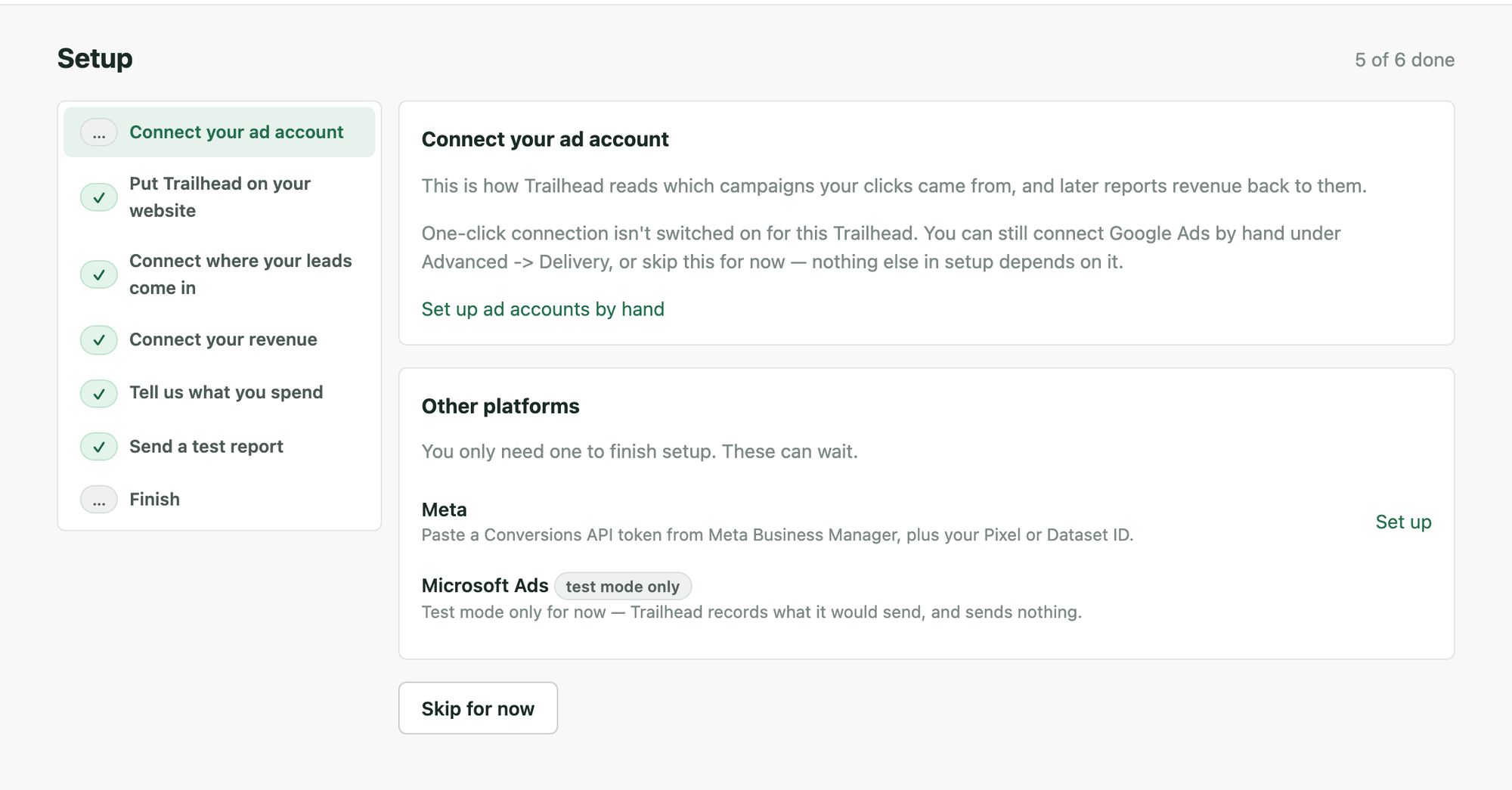
And an export you can hand to anyone
One click produces a standalone HTML report with the numbers baked in. No login, no link that expires, nothing that phones home. Put it next to what the platforms told you for the same period. The gap between those two documents is the reason this product exists.
Review first, transmit second
Smart bidding optimizes toward whatever conversions it is given. Give it form-fills and it buys form-fills. Give it banked revenue and it starts buying customers. Closing that loop is the point, and it is built deliberately backwards from most tools.
Preview
Trailhead shows you every conversion it would send and every one it would hold back, each with its reason. Nothing leaves the building at this stage.
Approval bound to the plan
Approval covers exactly the plan you read. Change the data, the account or the destination and the approval is void. What you approved is exactly what can go, or nothing goes.
A send that cannot repeat
Every conversion is recorded in a permanent ledger. Retrying a batch or re-running a plan cannot send a conversion twice.
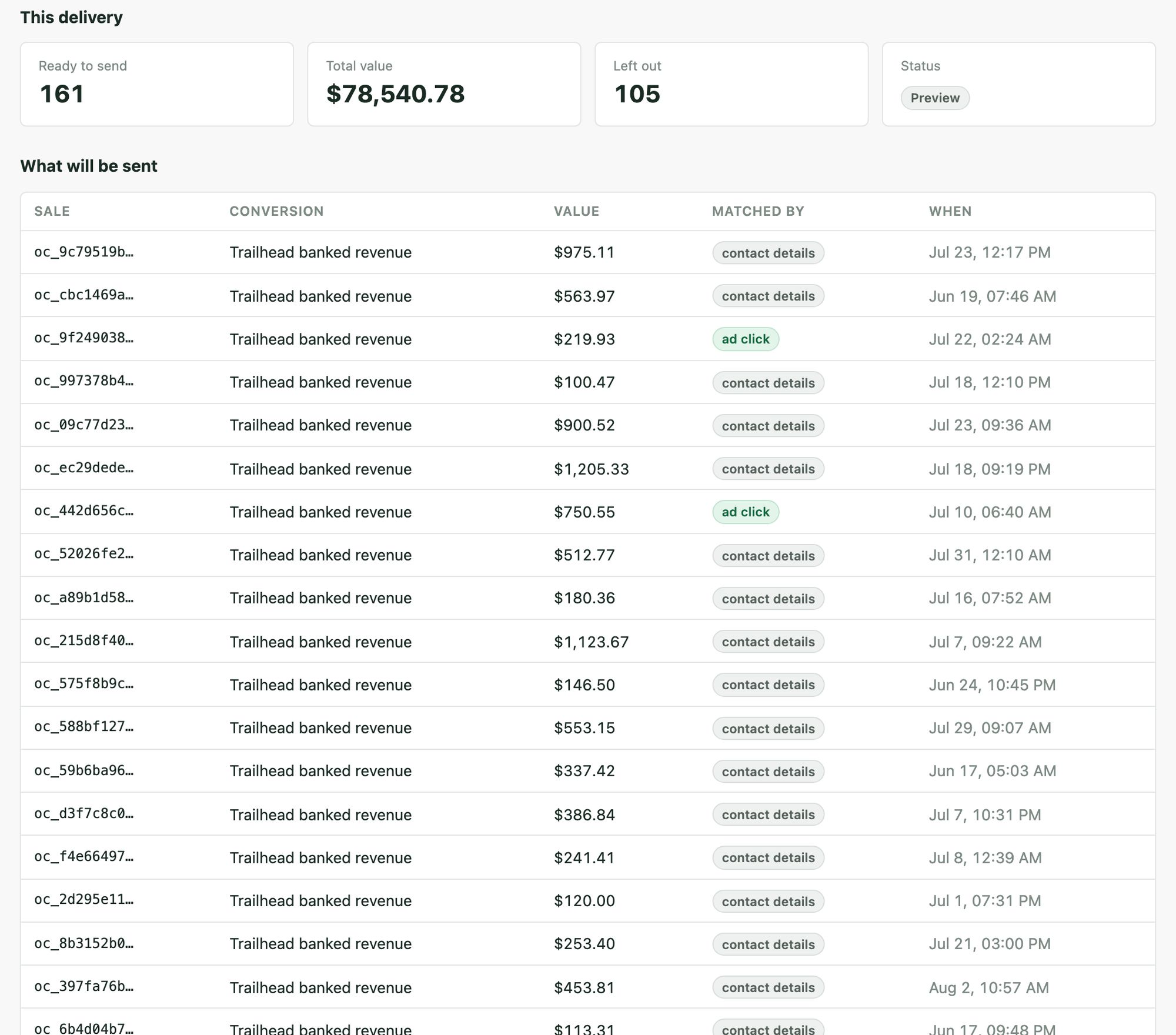
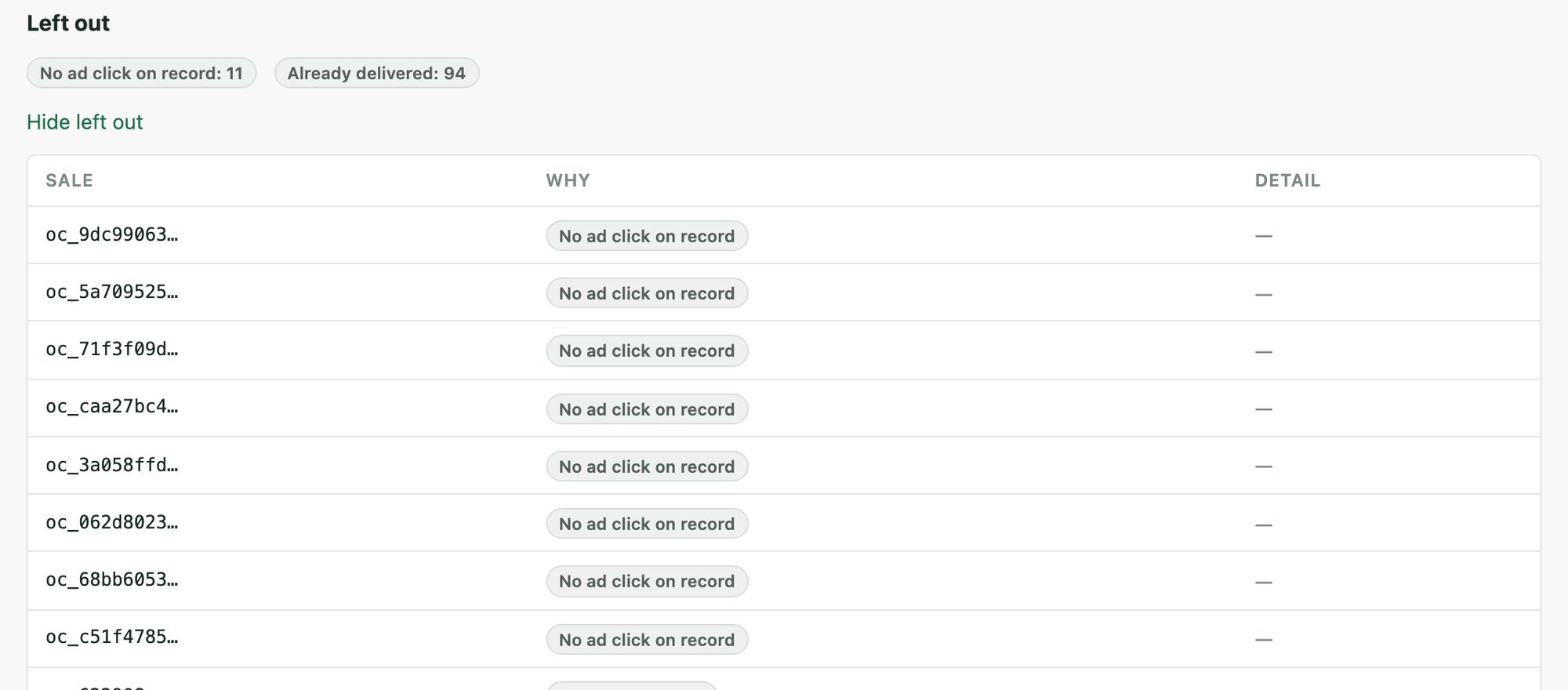
Where this stands today. Adapters for Google, Microsoft and Meta are built against doc-verified fields, and the release runs delivery in sandbox by default: payloads are assembled, recorded and auditable, and nothing is transmitted. Live send is gated twice, once per build and once per workspace, and is turned on account by account as verification against a real account completes. You lose nothing waiting. The plans, approvals and ledger built in sandbox are the same objects that go live.
Three products, one operating loop
Trailhead is the middle step. Analyze what the platforms claim, attribute what actually happened, then act on both.
TrailMap
Turns paid-media exports and connected accounts into a prioritized action plan. It answers what the platforms are claiming and what to do about it.
findtrailmap.com →Trailhead
Establishes what actually happened by joining first-party clicks to banked revenue. Trailhead imports TrailMap's claimed spend and exposes its own attributed-revenue feed for TrailMap to pull.
How the two connect →Outfitter
The execution layer. Build a batch of ad changes, preview it against the live account, publish only what a person approved. No data link to Trailhead exists yet; that is on the roadmap for both products.
adsoutfitter.com →What Trailhead does not do yet
The same honesty the product applies to your numbers, applied to itself.
- Live conversion sending is being switched on account by account Delivery runs in review-first sandbox mode. Senders go live per account as verification completes, gated once per build and once per workspace.
- No direct CRM API pulls ServiceTitan, Shopify and Magento are supported through their exports and webhooks with field-mapping templates. There is no API integration that reaches into them and pulls.
- One attribution family Five deterministic models ship. A data-driven model is deliberately deferred until there is enough volume to make it honest.
- Team invites hand you a temporary password You deliver it yourself. Email delivery is coming.
- Single sign-on is not shipped OIDC is on the enterprise track and gets scoped with you rather than promised here.
- TrailMap exchange is import and export, not a background feed The surfaces are live and connected customers use them today. Hands-off two-way synchronization is the next step, not the current state.
The ones that come up first
Do I have to put another pixel on my site?
No. Capture is a one-line snippet posting to a worker on a subdomain you own, or posting directly to your own signed endpoint if you would rather not deploy a worker. It sets no cookies and reads nothing about the visitor beyond the ad parameters already in the URL.
What happens to revenue that does not match anything?
It stays visible as unmatched, with its own number on the dashboard. It is never spread across channels to make the attributed figure look complete. A low match rate is a fact about your data collection, and hiding it would only delay fixing it.
How is this different from what my ad accounts already report?
Your ad accounts report their own claimed conversions. Trailhead reports revenue that arrived in your systems, joined to a click by a rule you can name. The reconciliation screen puts the two next to each other, including an explicit warning that platform numbers overlap and a blended total will double-count.
Can I see what would be sent before anything is sent?
That is the entire design. Every delivery starts as a preview listing what would go and what would be held back, with reasons. Approval covers exactly the plan you reviewed, so a plan that changed afterwards cannot go. And the release defaults to sandbox, where payloads are built and recorded and nothing is transmitted at all.
Where does my customer data live?
Email and phone are hashed at ingress and only hashes are stored. Raw request bodies are never persisted. Connector credentials and webhook keys are encrypted at rest with a key held outside the database, and no endpoint returns one. There is a per-person erasure operation and a full workspace purge behind a typed confirmation.
What does it cost?
$249 a month standalone, or $399 for TrailMap and Trailhead together. Full detail on the pricing page, including what is deliberately not a paid tier.
Find out what your ads actually did
Early access is open. We will wire capture with you, bring in your first outcomes file, and run matching on your real data so the first dashboard you see is your own.